
New Year 2026: How to use WhatsApp new year stickers, video call effects and other features to make your celebrations more fun |
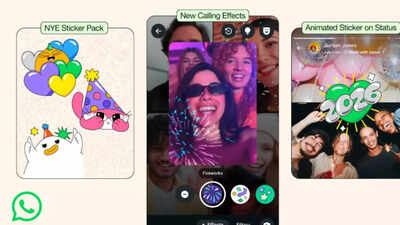

New Year’s Eve is just around the corner, and is ready to knock at your door. With billions of messages and calls spreading across family, friends, and loved ones around the world Right from online get-togethers to exciting group messages, WhatsApp has a very important role to perform in enabling people to celebrate and share their New Year messages. This time around, WhatsApp has come up with party-themed features such as a 2026 sticker package, video call effects, animated confetti reactions, and animated status stickers to make celebrations more interactive and exciting. Below is a step-by-step guide to make use of these features in an effective way to make the New Year celebrations memorable for you.
How WhatsApp’s new features can make your New Year celebrations more memorable
WhatsApp New Year stickers pack 2026
Sticker messages are a great way of expressing emotions and wishes through fun stickers. The 2026 WhatsApp sticker set is made exclusively for the New Year. It will help the user express the feelings of celebration.Steps to use the 2026 Sticker Pack:
- Go to any individual or group chat.
- Click the emoji icon in the text area.
- Switch to the Sticker tab (square icon w/ folded corner).
- Scroll down until you see the 2026 pack of stickers or click “+” to download.
- – Tapping any sticker will instantly send the sticker to the chat box.
- Use with text to create personalised New Year greetings.
Adding some stickers to the message gives the message an added touch of festivities and playfulness, especially when the message contains greetings to more than one friend or family member at the same time
Add video call effects
Video calling features prominently in virtual celebrations, mainly in the case of friends or family members who live in distant places.Usage of video call effects:
- Begin a video call in a one-on-one or group setting.
- Tap the “effects” icon on your screen (sparkle or magic wand).
- Choose the available effects: firework, confetti, or stars.
- Adjust the intensity or turn the effects on/off.
- Enjoy your New Year call with additional graphic festivities.
It makes online meetings very lively and interesting with energy and a festive feel.
Celebrate with animated confetti reactions
Animated confetti reactions let you instantly respond to messages or announcements with a visual celebration, enhancing interaction in chats.How to use animated confetti reactions
- Open the conversation and choose the message to which you want to respond.
- Tap and hold the message until the reaction menu appears.
- See animated confetti appearing on the screen for all chat members.
This is perfect for emphasising important events such as countdown messages of invitations to parties or celebrations and fun messages that bring smiles without requiring the user to type out a message,” states the designer.
Enhance status updates with animated stickers
WhatsApp now allows animated stickers on Status updates, allowing users to share greetings or celebrations with movement, giving messages a dynamic touch.How to use:
- Open WhatsApp and switch to the “Status” page.
- Touch “My Status” and choose a picture or video to set as the background.
- Click the sticker icon on the top menu bar.
- Select animated stickers, including the 2026 festive pack.
- The sticker will change size and position by pinching or dragging.
- Post your Status to share with all your contacts.
This serves to assist users in extending Happy New Year messages to their friends, even if they are not in their personal conversations.
Tips for a smooth New Year celebration on WhatsApp
- Start early: Make plans for the group messages and events. Avoid doing everything last-minute.
- Control the number of people in a video call: If there are too many people in a video call, it may slow the connection speed.
- Combine features: Use stickers, confetti reactions, and status updates all at once.
- Keep it personal: Record personal voice messages or videos for friends who cannot be present in person. Notifications: Notify Notifications: Pin important messages so no one misses critical updates about timings or locations.
- Safety tips: Share your live location with trusted friends and family only.